
Overview
Microsoft is retiring the legacy MFA and SSPR policies by 30th September 2025 as part of its modernisation path. Migrating to the new Authentication Methods policy offers more precision, central control, and futureproof cloud environment.
The new Microsoft Entra ID authentication method policy offers a unified, modern way to manage your organisation’s authentication methods, modernising identity management, consolidating methods for multi-factor authentication, self-service password resets (SSPR), and enhancing security with features like FIDO2 passkeys, passwordless authentication and conditional access.
This guidance outlines the key phases and best practices for migrating authentication methods from legacy per-user multifactor authentication and self-service password authentication to a consolidated authentication policy in Microsoft Entra ID.
What’s Changing and Why It Matters
- Consolidated management: The new Authentication Methods policy enables unified configuration for MFA, SSPR, and passwordless methods with flexibility based on users or groups.
- Improved security & control: You can enforce more secure methods (like passkeys, Temporary Access Pass, or Microsoft Authenticator), and apply fine-grained settings such as device preferences or user experience prompts.
- Modern sign-in flexibility: The policy supports authentication and password reset scenarios, though some methods may be limited to one use case (e.g., FIDO2 for authentication only).
- An easy rollback option: The migration process is fully reversible, and legacy policies can be re-enabled if needed.
Migration of Authentication Methods
Migrating to the authentication method policy can be completed manually or automatically. Administrators can manually migrate policy settings to fit their schedules or use the automated guide for a quick Microsoft-assisted migration. The migration process is fully reversible.
Automated migration guide
This lets administrators use the Entra admin centre wizard to audit and migrate MFA/SSPR settings. This is especially useful when transitioning from legacy setups, as it reduces manual effort, minimises errors, and ensures consistent policy enforcement across the organisation. This helps streamline the process before the legacy policies are fully retired at the end of September 2025.
Automated migration to the authentication method policy – step by step
- Go to the Microsoft Entra admin centre and navigate to: Entra ID → Authentication Methods → Policies. Click Begin automated guide to open the built-in wizard.


- The wizard automatically reviews your current MFA and SSPR configurations. It identifies which authentication methods (e.g., SMS, voice call, Microsoft Authenticator) are enabled and how they’re scoped. Click Next to go to the review screen.
- Review Recommendations: If each method was active in legacy settings, the wizard suggests enabling it in the new Authentication Method Policy. You can edit each method’s configuration using the pencil icon, adjusting scope, registration rules, and contextual prompts.

- Apply Configuration: Once happy with the configuration settings, click Migrate. This action updates the Authentication Method Policy to match your selections and disables legacy MFA and SSPR policy enforcement. Legacy settings will appear greyed out.
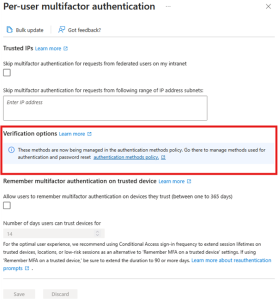
- Confirm Migration Status: Your migration status updates to Migration Complete. You can revert to In Progress, which allows temporary fallbacks to legacy settings during testing or phased rollout.
Manual migration guide
This option lets you audit current settings and manually configure the authentication methods policy. Administrators can go to the Entra admin centre and explicitly enable or disable each method for specific users or groups. You can configure settings like whether users can use mobile or office phones for voice calls or whether location context is shown during passwordless sign-in. This approach gives granular control but can be time-consuming, especially during large-scale migrations from legacy MFA or SSPR policies.

Manual migration to the authentication method policy step by step
Audit Existing Policies:
- MFA: Entra ID > Users > Per-user MFA > Service Settings
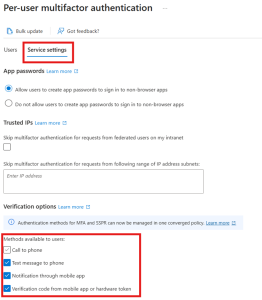
- SSPR: Entra ID > Password reset > Authentication methods

- Authentication Methods Policy: Entra ID > Authentication methods > Policies

Update the migration status to Migration In Progress. This applies your new policy to both sign-in and password reset scenarios, however, respecting your legacy policies.

Configure Authentication Methods Policy
- Match legacy settings for improved security.
- Enable methods like:
- Microsoft Authenticator
- Temporary Access Pass
- FIDO2 security keys
- Hardware and Software OATH tokens
- Email OTP for B2B users
Note: SSPR security questions are currently not supported. Controlling Security questions will remain in SSPR. If you use security questions and don’t want to disable them as part of this migration, keep them enabled in the legacy SSPR policy. Migration can be completed irrespective.
Manage Scope
- Apply policies to all users or specific groups.
Exclude groups as needed for flexibility. 
Finalize Migration
As a best practice, after updating the Authentication methods policy, it’s recommended that you go through your legacy MFA and SSPR policies and remove each authentication method one by one. Then, test and validate the changes for each method.
When you determine that MFA and SSPR work as expected, and you no longer need the legacy MFA and SSPR policies:
- Set migration status to “Migration Complete”.
- Legacy policies become inactive but reversible; you can move the migration state back to Migration in Progress anytime.

Pro Tips
Migrating to the Authentication Methods policy ensures compliance with industry-best standards. It’s also an opportunity to elevate your identity security and modernise your authentication experience. This move enables user-friendly and secure identity management with centralised control, passwordless options, and improved granularity.
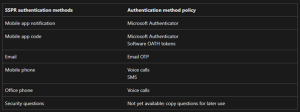
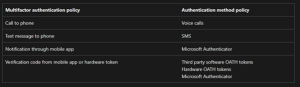
Use the screenshots below to validate the mapping between legacy authentication methods and the new authentication policy.
Multifactor authentication policy to authentication method policy mapping:
SSPR authentication methods to the authentication method policy mapping: